
Vinyl Setup for Beginners — Everything You Need to Play Records

A vinyl setup for beginners involves four components: a turntable, a phono preamp, an amplifier, and a pair of speakers. Specifically, each component performs a different function. Understanding that chain is the key to buying the right combination without duplicating components or leaving gaps that produce no sound. This guide explains what each component does, how they connect, and which turntable suits each budget and skill level. The amplifier and speaker recommendations link to dedicated guides that cover those components in detail, since they apply to far more than vinyl listening.

The four components of a vinyl setup:

  • Turntable — reads the groove and produces a phono-level signal
  • Phono preamp — amplifies and equalises the phono signal to line level (may be built into the turntable or amplifier)
  • Amplifier — amplifies the line-level signal to drive the speakers
  • Speakers — convert the amplified signal into sound
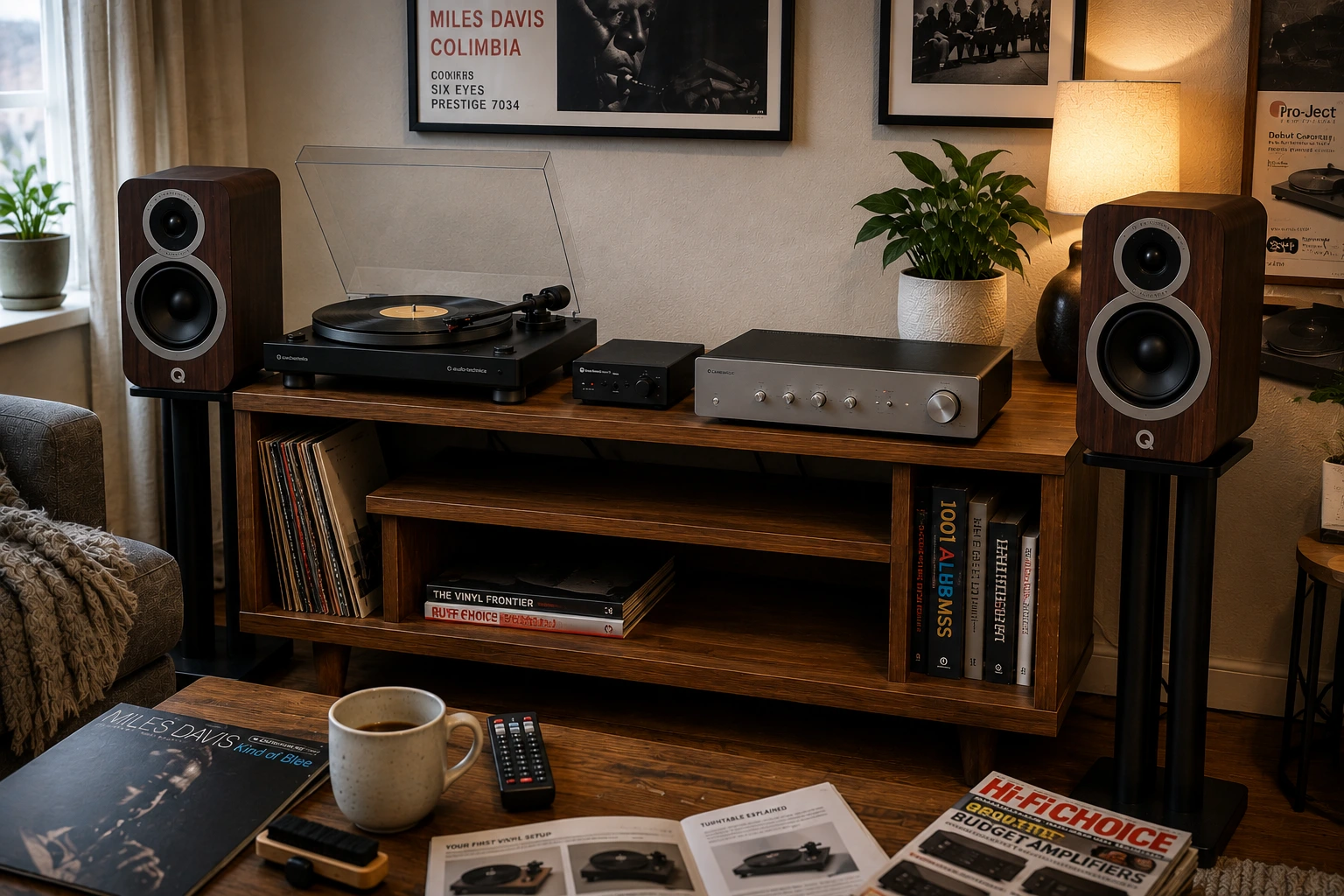
Complete vinyl setup for beginners showing turntable, phono preamp, integrated amplifier, and bookshelf speakers on a media console
A complete beginner vinyl setup — turntable, phono preamp, integrated amplifier, and bookshelf speakers. Understanding how these four components connect is the foundation of every vinyl system.

This article contains affiliate links. If you purchase through them, we may earn a commission at no extra cost to you. This helps support AmplifierZone and allows us to keep creating in-depth, unbiased audio guides.

How a Vinyl System Works

Specifically, a vinyl record stores audio as a physical groove pressed into the disc. Specifically, the groove contains microscopic lateral and vertical undulations — one channel of stereo audio on each wall of the groove. Specifically, the turntable’s stylus (needle) traces these undulations and transmits the movement to a cartridge, which converts mechanical movement into an electrical signal. This is called a phono-level signal — extremely low in voltage and requiring significant amplification before it can drive an amplifier’s input stage.

Furthermore, the phono signal is equalised during mastering using the RIAA curve — reducing low frequencies and boosting high frequencies during record cutting. Consequently, a phono preamp applies the inverse RIAA curve during playback — restoring the flat frequency response that the recording originally had. Without this equalisation, the sound is thin, tinny, and too quiet. Specifically, this is why a phono preamp is a non-negotiable part of any vinyl system.

The signal chain

Turntable → Phono preamp → Amplifier → Speakers

Each step in the chain has one job. The turntable reads the groove. The phono preamp amplifies and equalises the phono signal to line level. The amplifier boosts the line-level signal to drive the speakers. The speakers convert the amplified electrical signal into sound.

The Phono Preamp — The Most Misunderstood Component

The phono preamp is the component beginners most often overlook. It causes the most confusion when a new setup produces no sound or very quiet, distorted audio. Specifically, it is needed in every vinyl system. However, it does not always need to be a separate purchase — it may already be built into the turntable or the amplifier.

Where the phono preamp can live

Specifically, there are three possible locations for the phono stage in a vinyl system. First, built into the turntable — most entry-level turntables include a switchable built-in phono preamp. Second, built into the amplifier — many integrated amplifiers include a phono input with a built-in preamp. Third, as a separate standalone unit between the turntable and the amplifier. Specifically, the key rule is: exactly one phono preamp must be in the chain — no more, no less.

The most common beginner mistake: Connecting a turntable with a built-in phono preamp (line output) to an amplifier’s phono input (which also has a built-in preamp). The signal passes through two phono stages — the result is heavily distorted, bass-heavy audio. Always check whether the turntable outputs a phono signal or a line signal before connecting, and match it to the correct input on the amplifier.

How to check what your turntable outputs

Look for a line/phono switch on the rear of the turntable. If set to LINE, the built-in preamp is active — connect to a standard RCA line input on the amplifier. If set to PHONO, or if no switch exists, use the amplifier’s phono input — or add a separate phono preamp.

Phono Preamp Recommendations

For phono preamp picks at every budget, the best phono preamps guide covers specific units with connection instructions.

Turntable Types Explained

Belt drive vs direct drive

Belt drive turntables use a rubber belt to connect motor to platter — the motor sits to the side and drives the platter indirectly. Specifically, the belt isolates the platter from motor vibrations, which reduces the noise floor of the playback. Belt drive is the standard choice for home listening. Direct drive turntables connect the motor directly to the platter — producing higher torque and faster start-up speed. Specifically, direct drive is the standard for DJ use where back-cueing and manual manipulation are required. For home listening, either works — though belt drive dominates the audiophile home market at every price level.

Automatic vs manual

Specifically, automatic turntables return the tonearm to its rest position when the record ends — the motor stops and the stylus lifts automatically. However, manual turntables require the listener to lift the tonearm at the end of the record. Specifically, automatic mechanisms add complexity and potential failure points, but protect the stylus from repeatedly riding the run-out groove if the listener leaves the room. Consequently, for beginners, automatic operation removes one source of stylus wear and is worth the slight additional complexity at entry price.

Built-in preamp vs no preamp

Specifically, entry turntables almost universally include a switchable built-in phono preamp. Set to line output, they connect directly to any standard RCA input on an amplifier or powered speaker. Step-up turntables often omit the built-in preamp — requiring a separate phono stage that produces better results than an entry-level built-in circuit. Specifically, the three turntable picks below cover both approaches with clear connection guidance for each.

Three Turntable Picks for Your Vinyl Setup

Turntable Comparison at a Glance

Turntable Drive Operation Built-in Preamp Bluetooth USB
AT-LP60X Belt Automatic Yes (switchable) No No
AT-LP120XBT-USB Direct Manual Yes (switchable) Yes Yes
Pro-Ject Debut Carbon EVO Belt Manual No No No

1. Audio-Technica AT-LP60X — Best Entry Turntable for Beginners

Best for: First-time vinyl buyers who want the simplest possible setup — fully automatic, built-in phono preamp, die-cast aluminum platter, and Amazon’s Overall Pick with 500+ monthly purchases

Audio-Technica AT-LP60X turntable in a beginner vinyl listening setup with bookshelf speakers and amplifier
The Audio-Technica AT-LP60X — the most purchased entry turntable for a reason. Fully automatic operation, switchable built-in preamp, and a die-cast aluminum platter in a clean, compact form factor.
  • Drive type: Belt drive
  • Operation: Fully automatic — tonearm returns at record end
  • Speeds: 33⅓ and 45 RPM
  • Built-in phono preamp: Yes — switchable (line or phono output)
  • Cartridge: Audio-Technica AT3600L — pre-mounted, user-replaceable
  • Platter: Die-cast aluminum — anti-resonance
  • Bluetooth: No
  • USB: No

For any vinyl setup for beginners, the AT-LP60X is the most validated entry turntable available — Amazon’s Overall Pick with over 13,000 reviews and 500+ monthly purchases. Specifically, its fully automatic operation means the tonearm moves to the record, plays, and returns to rest without the listener needing to interact with it. This protects the stylus from the run-out groove and removes the learning curve of manual tonearm handling that puts off many first-time vinyl buyers. The built-in preamp connects directly to any line input on an amplifier or powered speaker. No separate phono stage is required.

However, the AT-LP60X’s simplicity comes with design trade-offs. Specifically, the tonearm is non-removable and the cartridge is not user-upgradeable to higher-end models. For listeners who plan to upgrade the cartridge or tonearm as their system improves, the AT-LP120XBT-USB is the correct starting point. Specifically, the AT-LP60X is the correct choice for listeners who want vinyl playback to be as simple as possible without any upgrade path in mind.

Pros
  • Fully automatic — tonearm moves, plays, and returns without manual intervention
  • Amazon’s Overall Pick — most validated entry turntable with 500+ monthly purchases
  • Built-in switchable phono preamp — connects directly to any line input
  • Die-cast aluminum platter — lower resonance than plastic alternatives at this price
  • Simple setup — out of box to playing in under 10 minutes
Cons
  • Non-upgradeable tonearm and cartridge — no upgrade path beyond the stock AT3600L
  • No Bluetooth or USB — wired RCA connection only
  • Two speeds only (33⅓ and 45) — no 78 RPM for older shellac records

View on Amazon

Best entry pick — fully automatic, built-in preamp, Amazon’s Overall Pick. Simplest path from box to playing vinyl.

2. Audio-Technica AT-LP120XBT-USB — Best Step-Up Turntable for Beginners

Best for: Beginners who want Bluetooth wireless playback, USB recording, and a replaceable cartridge system in a direct-drive turntable — the most feature-complete entry turntable available

Audio-Technica AT-LP120XBT-USB turntable in a vinyl listening setup showing Bluetooth and USB connectivity
The Audio-Technica AT-LP120XBT-USB — direct-drive, fully manual, with Bluetooth wireless output, USB digital recording, and a standard half-inch cartridge mount for future upgrades.
  • Drive type: Direct drive
  • Operation: Fully manual — tonearm placed and lifted by hand
  • Speeds: 33⅓, 45, and 78 RPM
  • Built-in phono preamp: Yes — switchable
  • Cartridge: Audio-Technica AT-VM95E — pre-mounted, half-inch mount, user-upgradeable
  • Bluetooth: Yes — wireless output to Bluetooth speakers or receivers
  • USB: Yes — vinyl-to-digital recording

The AT-LP120XBT-USB is significantly more capable — direct-drive motor, standard cartridge mount, Bluetooth, USB recording, and three speeds including 78 RPM. Specifically, the standard half-inch mount accepts any compatible cartridge — from the AT-VM95E up through higher-end Ortofon models — without replacing the turntable. Consequently, this makes the AT-LP120XBT-USB a genuine long-term starting point rather than a disposable entry unit.

Bluetooth and USB Features

The Bluetooth output sends audio wirelessly — removing cable runs in setups where the turntable and speakers are not adjacent. However, Bluetooth audio introduces compression and latency that wired connections do not, so wired RCA connection is the better choice for critical listening. Additionally, the USB output allows vinyl recordings to be captured directly to a computer — useful for digitising a record collection. Manual operation requires the listener to place and lift the tonearm — a skill that takes a few records to develop but is not difficult.

Pros
  • Standard half-inch cartridge mount — upgradeable to any compatible cartridge
  • Bluetooth output — wireless connection to Bluetooth speakers or receivers
  • USB recording — digitise vinyl directly to a computer
  • Three speeds including 78 RPM — plays shellac records as well as standard vinyl
  • Built-in switchable preamp — connects directly to any line input
Cons
  • Manual operation — tonearm placed and lifted by hand; no automatic return
  • Bluetooth adds compression and latency — wired connection preferred for critical listening
  • Higher price than AT-LP60X — features may exceed what a first-time buyer needs

View on Amazon

Best step-up pick — direct drive, Bluetooth, USB, upgradeable cartridge. Most feature-complete entry turntable.

3. Pro-Ject Debut Carbon EVO — Best Audiophile Entry Turntable

Best for: Beginners who want an audiophile-grade belt-drive turntable with a carbon fibre tonearm and pre-mounted Sumiko Rainier cartridge — no built-in preamp, requires a separate phono stage

Pro-Ject Debut Carbon EVO turntable in a high-fidelity vinyl listening setup with separate phono preamp and bookshelf speakers
The Pro-Ject Debut Carbon EVO — a carbon fibre tonearm, Sumiko Rainier cartridge, and belt-drive platter in Pro-Ject’s entry audiophile design. Requires a separate phono preamp — the correct choice for listeners who want to maximise long-term sound quality.
  • Drive type: Belt drive
  • Operation: Manual — tonearm placed and lifted by hand
  • Speeds: 33⅓ and 45 RPM (electronic speed change)
  • Built-in phono preamp: No — separate phono preamp required
  • Tonearm: Carbon fibre — lighter and stiffer than aluminium alternatives
  • Cartridge: Sumiko Rainier MM — pre-mounted and aligned
  • Platter: MDF with felt mat — resonance damped

Indeed, the Pro-Ject Debut Carbon EVO is the entry to genuinely audiophile-grade turntable design. Specifically, the carbon fibre tonearm is lighter and stiffer than the aluminium arms in the AT-LP60X and AT-LP120XBT-USB. Lower mass means the stylus tracks with less downforce, reducing record and stylus wear. The pre-mounted Sumiko Rainier is a proper moving magnet cartridge above the Audio-Technica stock level. It ships already aligned to the tonearm for correct azimuth and overhang.

However, the Pro-Ject has no built-in phono preamp — a separate phono stage is required between the turntable and the amplifier’s line input. However, this adds cost and a connection step. It also means the phono stage quality is not limited by a budget built-in circuit. Specifically, pairing the Debut Carbon EVO with a standalone phono preamp produces better results than a built-in preamp or a budget amplifier’s phono stage. The Pro-Ject suits listeners building a vinyl setup who want a foundation that will not need replacing as the system improves.

Pros
  • Carbon fibre tonearm — lower mass, higher stiffness than aluminium alternatives
  • Sumiko Rainier cartridge — pre-mounted and aligned at audiophile entry level
  • Electronic speed change — no manual belt repositioning for 45 RPM
  • Belt drive isolation — motor vibration separated from the platter
  • Upgradeable cartridge — standard mount accepts a wide range of replacements
Cons
  • No built-in phono preamp — separate phono stage required (additional cost)
  • Manual operation only — no automatic tonearm return
  • No Bluetooth or USB — wired connection only
  • Higher price — correct for listeners who want long-term performance, not entry convenience

Is the Pro-Ject the Right Choice for Your Vinyl Setup?

View on Amazon

Best audiophile entry — carbon fibre tonearm, Sumiko Rainier cartridge, belt drive. No built-in preamp — requires separate phono stage.

Choosing the Right Amplifier for a Vinyl Setup

What the Amplifier Does in a Vinyl Setup

Overall, the amplifier amplifies the line-level signal from the phono preamp to drive the speakers — the same function as in any passive speaker system. Specifically, the key question for vinyl listeners is whether the amplifier has a built-in phono stage. An amplifier with a phono input handles RIAA equalisation internally — the turntable connects directly to the phono input and no separate preamp is needed.

Amplifiers with built-in phono stages

Specifically, several amplifiers include built-in MM phono stages — the Sony STR-DH190, Cambridge AXA35, Denon PMA-600NE, Yamaha A-S501, and AXR100 all accept moving magnet cartridges directly. Furthermore, for beginners using the AT-LP60X or AT-LP120XBT-USB with the preamp switched OFF, these amplifiers provide the phono stage without an additional component purchase.

Amplifier Power for a Vinyl Setup

Vinyl listening in a beginner vinyl setup is typically at moderate room levels — the power requirements are the same as for any bookshelf speaker system. Specifically, 30–80W per channel is adequate for most passive bookshelf speakers at typical home listening levels. For amplifier power matching by sensitivity and impedance, the amplifier to speaker matching guide covers the calculation. For specific amplifier model recommendations across every budget, the best amplifiers for bookshelf speakers guide maps compatible picks.

Choosing the Right Speakers for Your Vinyl Setup

Specifically, speakers for a vinyl setup are the same passive bookshelf speakers that suit any home audio system. Indeed, there is no specialist speaker category for vinyl playback. Consequently, what matters is the same combination of sensitivity, impedance, and power handling that determines correct amplifier pairing in any setup. For the passive vs active speaker distinction, the passive vs active speakers guide covers both paths.

Speaker Character for Vinyl

Specifically, neutral speakers reveal more of what is on the record than speakers with coloured bass and treble. Specifically, vinyl recordings vary considerably in tonal balance — particularly older pressings. Consequently, a neutral speaker communicates this variation honestly rather than masking it. For five speaker picks matched to amplifiers at each budget, the best bookshelf speakers for home audio guide covers entry to reference.

Three Complete Vinyl Setup Paths for Beginners

Path 1 — Simplest setup (AT-LP60X)

AT-LP60X (line output, built-in preamp ON) → Amplifier line input → Passive speakers

No separate phono preamp needed. The AT-LP60X’s built-in preamp handles RIAA equalisation. Connect the RCA output (line level) to any standard line input on the amplifier. Works with any amplifier — phono input or line input both accept the AT-LP60X’s line output correctly when the preamp is switched on.

Path 2 — Step-up setup (AT-LP120XBT-USB)

AT-LP120XBT-USB (line output, built-in preamp ON) → Amplifier line input → Passive speakers

OR: AT-LP120XBT-USB (phono output, built-in preamp OFF) → Amplifier phono input → Passive speakers

The AT-LP120XBT-USB offers both paths. Using the built-in preamp is simpler. Switching to phono output and using the amplifier’s phono input (if available) may produce marginally better results with a higher-quality amplifier phono stage. Bluetooth output can also connect to Bluetooth-enabled speakers or receivers wirelessly.

Path 3 — Audiophile entry setup (Pro-Ject Debut Carbon EVO)

Pro-Ject Debut Carbon EVO (phono output) → Separate phono preamp → Amplifier line input → Passive speakers

OR: Pro-Ject Debut Carbon EVO (phono output) → Amplifier phono input → Passive speakers

The Pro-Ject has no built-in preamp — a phono stage is required. Using a dedicated standalone phono preamp produces the best results. Alternatively, using the amplifier’s built-in phono input (if available) is simpler and saves cost. The separate phono preamp path is the correct choice for maximising the Pro-Ject’s capability.

Step-by-Step Setup Instructions

Step 1 — Unbox and position the turntable

Place the turntable on a level, stable surface — vibrations from the surface (footsteps, speaker bass) are transmitted to the platter and can cause the stylus to skip. Specifically, dedicated turntable isolation platforms or thick rubber feet reduce surface-borne vibration. Keep the turntable away from speakers — speaker vibration is the most common cause of skipping at higher volumes.

Step 2 — Remove the transit screws and stylus protector

Pro-Ject turntables ship with transit screws securing the tonearm — remove these before playing. All turntables ship with a stylus protector covering the needle — remove this carefully before placing the stylus on a record. Specifically, playing with the stylus protector in place produces no audio and can damage the cartridge.

Step 3 — Set the correct output mode

On turntables with a built-in preamp (AT-LP60X, AT-LP120XBT-USB), set the line/phono switch to LINE if connecting to a standard line input on the amplifier. Set it to PHONO if connecting to a phono input on the amplifier. Specifically, check this switch before connecting — the wrong setting is the most common cause of no sound or distorted audio in a new vinyl setup.

Step 4 — Connect to the amplifier

Connect the turntable’s RCA output to the correct amplifier input. Use a line input (AUX, CD) if the turntable is set to LINE output. Use a phono input if set to PHONO output and the amplifier has a phono stage. Most turntables also include a separate ground wire — connect this to the amplifier’s ground terminal (usually labelled GND) to eliminate hum.

Step 5 — Set tracking force and anti-skate (manual turntables)

Manual turntables — AT-LP120XBT-USB and Pro-Ject Debut Carbon EVO — require tonearm tracking force and anti-skate to be set correctly. Specifically, tracking force is the downward pressure the stylus applies to the groove, measured in grams. The correct value is printed in the cartridge manual — typically 1.5–2.5g for moving magnet cartridges. Anti-skate should match the tracking force setting. Incorrect tracking force causes excessive groove and stylus wear — too light causes skipping, too heavy causes distortion and accelerated groove damage.

Step 6 — Play a record

Place a record on the platter, start the motor (automatic turntables do this via the start lever), and lower the stylus onto the lead-in groove. For automatic turntables, the mechanism handles this. For manual turntables, use the cueing lever — not bare fingers — to lower the tonearm gently onto the record. The cueing lever is specifically designed for this — using it prevents accidental stylus impacts that can damage the cartridge.

Frequently Asked Questions

Do I need a phono preamp if my turntable has a built-in one?

No — if the turntable’s built-in preamp is switched on (line output mode), the RIAA equalisation is handled inside the turntable. Connect the RCA output to any standard line input on the amplifier. Do not connect to a phono input on the amplifier when the turntable is set to line output — the signal will pass through two phono stages and produce distorted, bass-heavy audio.

Why does my turntable sound very quiet or distorted?

The most common cause is a signal chain mismatch. If the turntable is set to phono output but is connected to a line input (rather than a phono input), the signal is too quiet and lacks correct equalisation. If the turntable is set to line output but is connected to a phono input, the signal is over-amplified and distorted. Check the line/phono switch on the turntable and the input selected on the amplifier — they must be matched correctly.

What is the difference between the AT-LP60X and AT-LP120XBT-USB?

The AT-LP60X is fully automatic with a fixed cartridge and no wireless capability — correct for beginners who want simplicity. The AT-LP120XBT-USB is manual with Bluetooth output, USB recording, three speeds, and a standard upgradeable half-inch cartridge mount. Consequently, the AT-LP120XBT-USB is the better long-term investment for listeners who want to upgrade the cartridge or add wireless playback. The AT-LP60X is the better choice for listeners who want vinyl to be completely hands-off.

Does the Pro-Ject Debut Carbon EVO need a separate phono preamp?

Yes — the Pro-Ject Debut Carbon EVO has no built-in phono preamp. A separate external phono preamp is needed between the turntable and the amplifier’s line input, unless the amplifier has a built-in phono stage. Many integrated amplifiers include MM phono stages — check the amplifier’s input specifications before purchasing. For standalone phono preamp recommendations, the best phono preamps guide covers specific picks at entry and mid-range prices.

Can I connect a turntable directly to a Bluetooth speaker?

Only if the turntable has Bluetooth output — the AT-LP120XBT-USB does. Most turntables output a wired RCA signal that requires an amplifier. Some Bluetooth speakers include a built-in phono preamp and RCA input — check the speaker’s specifications. Otherwise, the connection chain is: turntable → phono preamp (or turntable’s built-in preamp set to line output) → amplifier → speakers. Skipping any step produces no sound or distorted audio.