
Yes, you can connect a turntable directly to powered speakers. The important part is matching the turntable’s output to the speaker’s input: a PHONO signal needs a phono preamp, while a LINE signal can go straight into a speaker’s LINE, AUX, or RCA input.
Bottom line: your signal path needs exactly one phono preamp. Use the preamp built into the turntable, an external phono preamp, or the PHONO input built into compatible powered speakers—but never zero and never two.
Affiliate Disclosure: AmplifierZone is reader-supported. As an Amazon Associate I earn from qualifying purchases.
- Identify your inputs before connecting anything
- Choose the correct signal path
- Setup 1: Turntable with a built-in preamp
- Setup 2: Turntable plus an external phono preamp
- Setup 3: Powered speakers with a PHONO input
- Optional: Bluetooth turntable to Bluetooth speakers
- Cable, placement, and grounding checklist
- Troubleshooting no sound, low volume, distortion, and hum
- Frequently asked questions
Before you connect anything: find the labels that matter
Powered speakers have amplifiers built in, so you do not need a separate stereo receiver simply to make sound. You do, however, need to identify the signal type at both ends of the connection. Look at the rear of the turntable for a PHONO/LINE switch, fixed RCA leads or RCA output jacks, a ground wire, and possibly Bluetooth. Then look at the powered speaker’s main input panel for labels such as PHONO, LINE, AUX, RCA, or Bluetooth.
The same system can be wired in several correct ways. The right one depends on whether the turntable or powered speaker already includes the phono stage. For the bigger picture of a vinyl chain—from record groove to speaker cone—see our beginner’s vinyl setup guide.
| What you have | Correct connection path | What to avoid |
|---|---|---|
| Turntable with a built-in preamp; powered speaker with LINE/AUX input | Turntable set to LINE → RCA cable → speaker LINE/AUX | Sending the LINE signal into a PHONO input |
| Turntable without a preamp; powered speaker with LINE/AUX input | Turntable PHONO output → external phono preamp → speaker LINE/AUX | Connecting the raw PHONO signal directly to AUX |
| Turntable without a preamp; powered speaker with PHONO input | Turntable PHONO output → speaker PHONO input | Adding another external phono preamp |
Choose the correct signal path
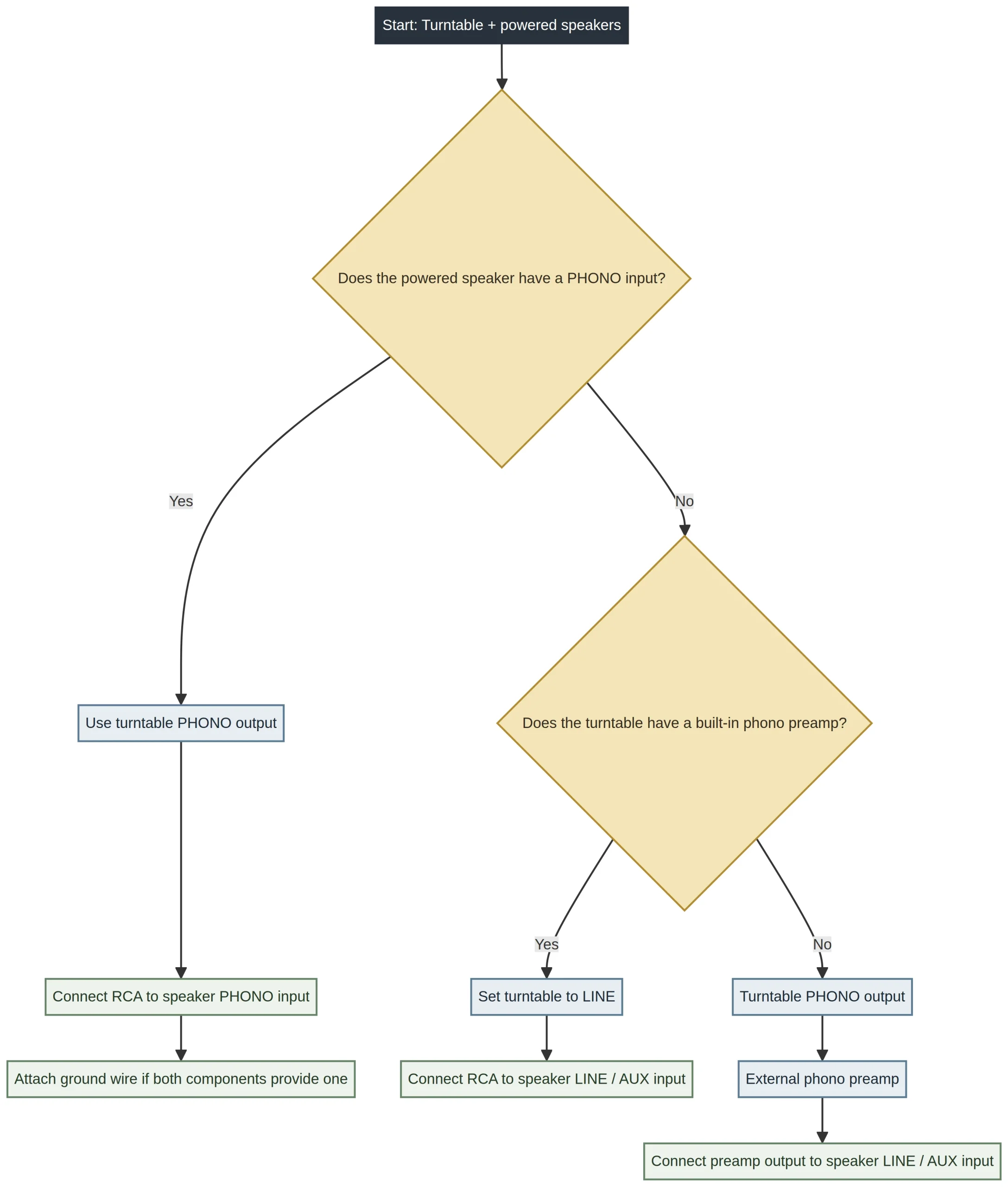
Start with the speaker. If it has a dedicated PHONO input, that input already contains the phono preamp you need. If it only has LINE, AUX, or standard RCA inputs, the phono stage must come from the turntable itself or from a separate external unit.
Setup 1: Turntable with a built-in phono preamp
This is the most common and simplest arrangement. Turntables with a built-in preamp convert their delicate cartridge signal to a normal line-level signal. Set the turntable’s PHONO/LINE switch to LINE, then connect its red and white RCA plugs to the powered speaker’s LINE, AUX, or RCA input. Select that source on the speaker and begin with the speaker volume turned down.
The Audio-Technica AT-LP60X is one familiar example of a turntable with a switchable PHONO/LINE output. Whatever model you own, confirm the labels in its manual before moving the switch; variants can differ.

Do not connect a LINE-level turntable output to the powered speaker’s PHONO input. That would put two phono stages in the path and can make the sound unnaturally loud, boomy, or distorted.
Setup 2: Turntable without a built-in preamp
If your turntable only provides a PHONO output and your powered speakers only provide LINE/AUX inputs, add an external phono preamp between them. Connect the turntable’s RCA outputs to the preamp’s input, then connect the preamp’s output to the powered speaker’s LINE/AUX input. Select the LINE/AUX source on the speaker before testing playback. For more help choosing a unit, see our phono preamp buying guide and ART DJPRE II review.
If the turntable has a separate ground wire and the phono preamp has a grounding terminal, connect it there before you troubleshoot anything else. The ground wire is intended to reduce hum in compatible systems; do not attach it to a random chassis screw when no labeled grounding point exists.

Setup 3: Powered speakers with a PHONO input
Some powered speakers include a dedicated PHONO input. In that case, the speaker already contains the phono preamp. Connect the turntable’s PHONO output directly to the speaker’s PHONO input, attach the ground wire if both products provide a labeled grounding point, and select PHONO on the speaker.
Keep a turntable with a switchable output in PHONO mode for this setup. The speaker’s PHONO input is designed to receive the lower-level, equalization-free signal from the cartridge—not a line-level signal that has already passed through a preamp.

Optional: Bluetooth turntable to Bluetooth powered speakers
A Bluetooth turntable can be convenient when you cannot run RCA cables cleanly across a room. Put the powered speakers in pairing mode, put the turntable in pairing mode, then confirm that the speakers select Bluetooth as the active source. Keep the two devices close together for the initial pairing process and consult each manufacturer’s instructions if they do not find one another.
This option is about convenience rather than replacing a carefully planned wired setup. A wired RCA connection avoids pairing steps and makes it easier to trace a signal problem. If your turntable supports Bluetooth, our AT-LP120XBT-USB review shows the kind of features and output choices to check before you buy.
Cable, placement, and grounding checklist
A correct connection can still sound poor if the turntable is vibrating, the input is wrong, or a cable is loose. Keep the turntable level on a rigid surface. Avoid placing it directly beside, on top of, or in the same cabinet compartment as a speaker; bass vibration can feed back into the stylus. Keep low-level RCA leads away from power supplies where practical, and route them without tight bends.
- Match red RCA to red/right and white RCA to white/left.
- Use the shortest practical, undamaged stereo RCA cable.
- Start with both the source and speaker volume low, then raise them gradually.
- Connect a ground wire only to a labeled ground terminal supplied for that purpose.
- Check that the powered speaker has power and that its correct source is selected.
- Use the turntable manufacturer’s recommended stylus force and setup procedure.
Troubleshooting: no sound, very low volume, distortion, or hum
| Problem | Most likely cause | First thing to check |
|---|---|---|
| No sound | Wrong source selected, loose RCA cable, or speaker not powered | Select PHONO, LINE/AUX, or Bluetooth to match the connection and reseat the RCA plugs. |
| Sound is very quiet and thin | A PHONO signal is entering a LINE/AUX input without a preamp | Add an external phono preamp or use a turntable/speaker with an active phono stage. |
| Sound is loud, muddy, or distorted | Two phono preamps are active | Do not use a LINE output into a PHONO input; make sure only one phono stage is active. |
| Hum or buzz | Missing ground path, a damaged cable, or nearby electrical interference | Connect the labeled ground wire where applicable, reseat cables, and move RCA leads away from power bricks. |
| Only one speaker plays | Loose RCA plug, incorrect balance setting, or faulty cable | Swap or reseat the red and white RCA plugs and test another cable if necessary. |
| Bluetooth will not pair | Wrong source, existing pairing, or pairing mode not active | Clear the old pairing if required, then place both devices in pairing mode and select Bluetooth on the speakers. |
When you need an amplifier anyway
Powered speakers contain amplification, so they are the right partner for this guide. Passive speakers are different: they require an amplifier or receiver between the turntable and speaker. If you are working with an external amplifier rather than powered speakers, follow our separate step-by-step turntable-to-amplifier guide instead of trying to adapt the connection paths above.
Final connection checklist
- Identify whether the turntable is set to PHONO or LINE.
- Identify whether the powered speaker input is PHONO or LINE/AUX.
- Use exactly one phono preamp in the signal path.
- Connect the ground wire only where a labeled grounding terminal is provided.
- Select the matching speaker source, start at low volume, and test one record.
This guide is informational. Input labels and switch positions vary by model, so follow the manufacturer’s manual for your exact turntable and powered speakers.
Frequently asked questions
Can I connect a turntable directly to powered speakers?
Do powered speakers need a phono preamp?
Why is my turntable so quiet through powered speakers?
Why does my turntable sound distorted through powered speakers?
Do I need to connect the ground wire?