Knowing how to use a guitar amp correctly from the start saves months of confusion and bad tone. Most beginners plug in and immediately reach for the volume knob. That is actually one of the last things to set, not the first. All these elements interact with each other in ways that are not obvious from the front panel. The input you use, the gain you set, and the output level you land on all affect one another. This guide walks through every stage of using a guitar amp correctly, from the first cable to a dialled-in tone. For players who have not yet chosen their first amp, the best guitar amps under $200 guide covers the most practical options at entry price.
Quick answer: Plug your guitar into the amp’s input jack, set all controls to noon (12 o’clock) as a starting point, set the master volume low before powering on, then gradually adjust gain, EQ, and volume to taste. Always turn the volume down before switching channels or disconnecting cables. Never turn a tube amp on without a speaker connected.
This article contains affiliate links. If you purchase through them, we may earn a commission at no extra cost to you. This helps support AmplifierZone and allows us to keep creating in-depth, unbiased audio guides.
Plugging In Correctly
Cable and input jack
Use a standard 6.35mm (quarter-inch) mono instrument cable to connect the guitar to the amp. Plug one end into the guitar’s output jack and the other into the amp’s input jack — typically labelled “Input”, “Guitar In”, or simply “In”. On amps with multiple inputs, use the standard input unless instructed otherwise. The instrument cable should click or seat firmly in both jacks; a loose connection causes noise and signal dropout.
Do not use a speaker cable as an instrument cable — they look identical from the outside but are wired differently. An instrument cable is shielded to prevent interference pickup; a speaker cable is unshielded and will introduce hum and noise. If you hear significant background noise after plugging in, check both cable ends, try a different cable, and verify the guitar’s output jack is tightened correctly.

Effects loop — what it is and when to use it
Many amps include an effects loop — a send and return jack pair on the back panel. The effects loop lets you insert external effects pedals between the amp’s preamp stage and its power stage. This matters for time-based effects: reverb, delay, and chorus placed in the loop receive the fully processed preamp signal, which generally produces cleaner results at higher gain settings. For beginners not yet using external pedals, ignore the effects loop entirely. Simply plug into the front input and leave the loop disconnected.
Powering On Safely
The correct power-on sequence
Before powering on any guitar amp, set the volume to zero or its minimum position. This prevents the loud pop that occurs when an amp powers up with the volume open. Repeated occurrences can stress the speaker. With volume at minimum, connect the guitar, power the amp on, and allow it to stabilise before raising the volume.
Tube amp safety — never run without a speaker connected: A tube amp’s output transformer requires a speaker load to operate safely. Running a tube amp with the speaker disconnected — or with the speaker cable pulled out while the amp is on — can damage the output transformer, which is an expensive repair. Always verify the speaker is connected before powering a tube amp on, and never unplug the speaker while the amp is in operation. Solid state amps do not have this requirement, but the habit is worth forming regardless of amp type.
Tube amp standby switches
Many tube amplifiers have a standby switch in addition to the main power switch. The correct sequence: power on first, let the valves warm up for 30–60 seconds, then switch standby off. When powering down, reverse it — standby on first, then power switch off. This protects the valves from thermal shock and extends their lifespan. Solid state amps do not have standby switches and can be powered on and off directly.
Understanding the Controls
What every control does
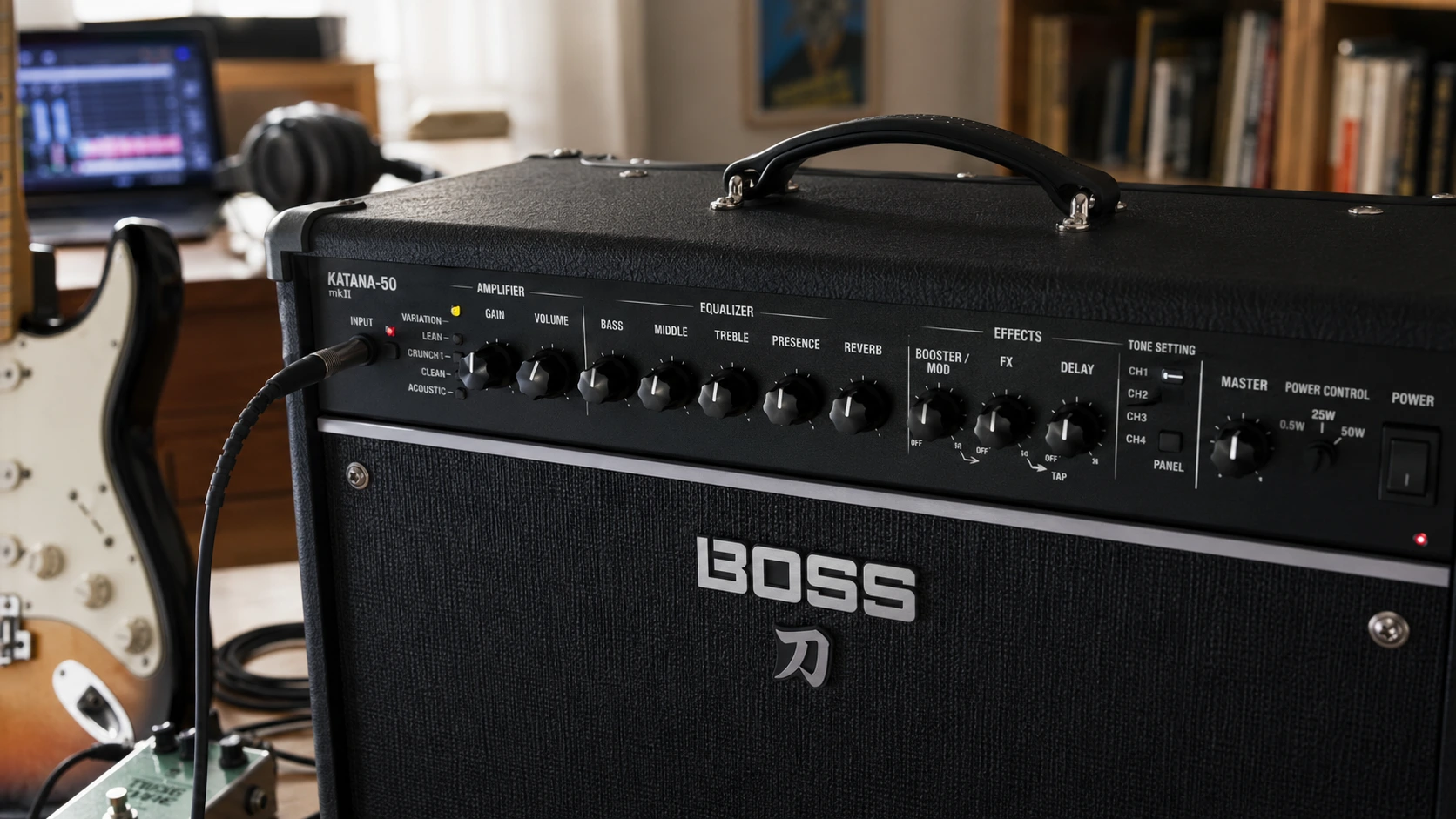
Guitar amp front panels vary between models, but most share a common set of controls. Knowing what each one does in isolation is the foundation for setting them together effectively:
- Input volume / Gain: Controls how hard the preamp stage is driven. Higher gain = more distortion and sustain. Lower gain = cleaner, more transparent signal.
- Master volume: Controls the overall output level after the preamp stage. Does not significantly affect distortion character — it controls how loud the amp is.
- Treble: Controls high-frequency content — brightness, attack clarity, pick noise. Too much causes harshness; too little causes dullness.
- Middle / Mid: Controls mid-frequency content — presence, cut-through, and warmth. Often the most musically significant EQ control for guitar.
- Bass: Controls low-frequency content — body, fullness, and weight. Too much causes muddiness, especially at higher gain.
- Presence: Controls upper-mid and high-frequency response after the power stage — adds edge and definition. Distinct from treble in its position in the circuit.
- Reverb: Controls the amount of reverb effect mixed with the dry guitar signal. A natural-sounding room ambience at low settings; wash at high settings.
- Channel switch / Channel selector: Switches between amp channels — typically Clean and Overdrive, or Clean, Crunch, and Lead on more complex amps.
Gain vs Volume — The Most Misunderstood Pair
Why these two controls confuse beginners
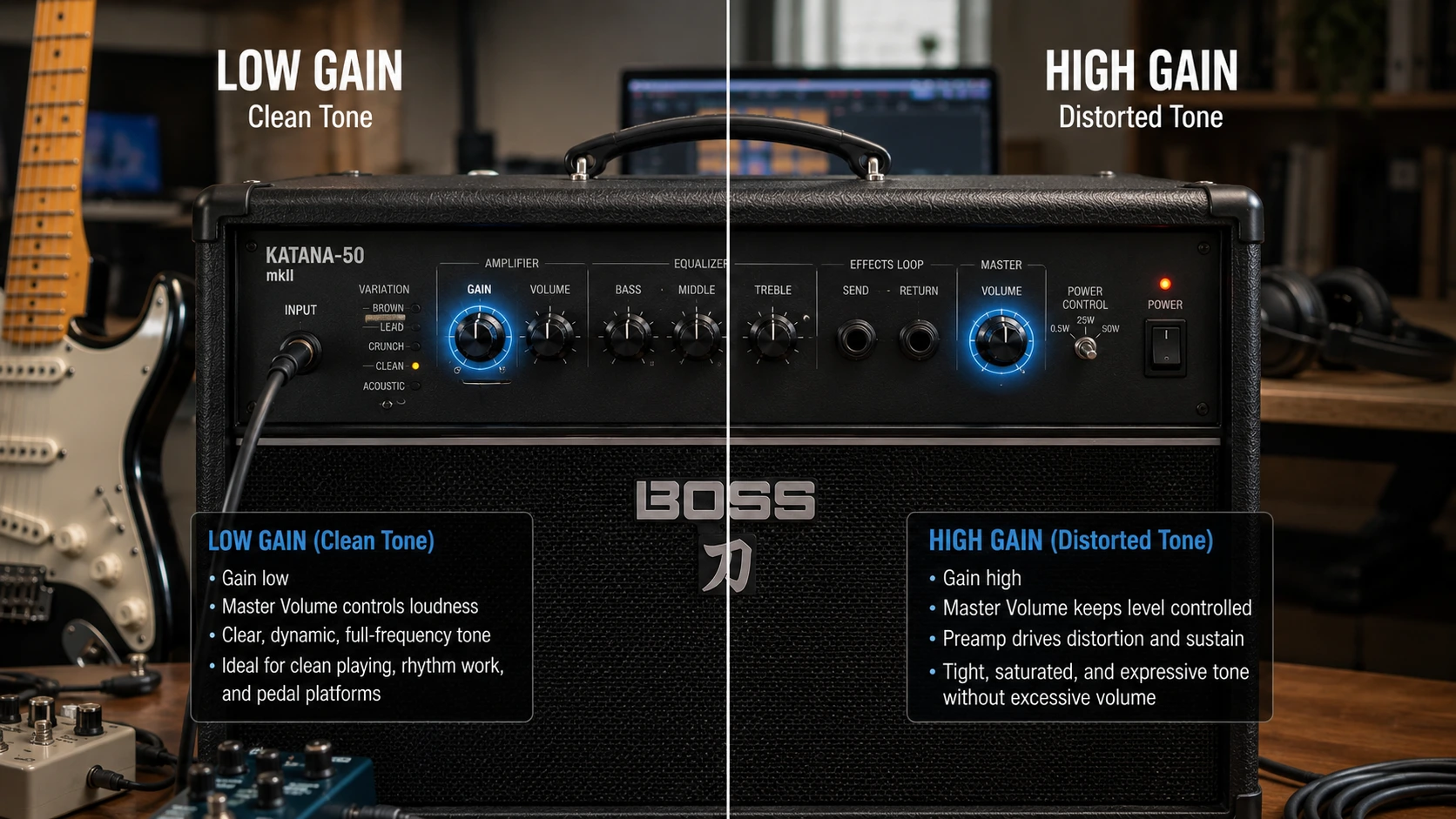
The gain and master volume controls on a guitar amp are frequently confused, and the confusion produces bad tone. Gain controls how hard the preamp stage is driven — determining distortion amount and sustain. Master volume controls the overall output level after the preamp. It determines how loud the amp is in the room without significantly changing the distortion character.
The practical result of this distinction matters. To get a clean tone at bedroom volume, set gain low and master volume to whatever level you need. For distorted tone at bedroom volume, set gain high and master volume low. The gain control sets distortion; the master handles loudness separately. Indeed, many beginners set gain low and master high, expecting more gain to produce more volume — then wonder why the amp sounds clean. Understanding how gain and volume interact is covered in more detail in the guitar amp settings for beginners guide.
Tube amp vs solid state gain behaviour
The character of the gain control differs between tube and solid state amps. On a tube amp, increasing gain drives the valve stages harder. This produces the gradual harmonic saturation described in the tube vs solid state guide — a smooth distortion that responds to pick attack. On a solid state or modelling amp, the gain control adjusts the amount of distortion applied by the processing stage. The response curve differs, but the fundamental principle — gain controls distortion, master controls volume — applies to both.
EQ and Tone Controls
Starting position — why noon is not always neutral
A common beginner approach is to set all EQ controls to noon (12 o’clock) as a neutral starting point. This is reasonable, but noon is not flat on every amp. Some have a slight mid boost at noon; others have a treble emphasis. Furthermore, “flat” EQ is rarely the goal. Room acoustics, pickup type, and playing style all require different adjustments to produce a balanced tone.
In practice, start at noon and adjust by ear. The most efficient approach is to set treble, mid, and bass to noon, then adjust one control at a time while playing. Make significant moves — shift controls by a meaningful amount rather than fractions of a position — so you can clearly hear the effect before fine-tuning.
The mid control — why it matters most
The mid-frequency control is the most musically significant EQ adjustment on most guitar amps — and the most commonly misused. Scooping the mids produces a wide tone that seems appealing in isolation. In a band mix, however, it disappears. Guitar’s primary frequency range overlaps directly with the midrange, so a scooped tone struggles to cut through a band. A mid-forward tone, by contrast, cuts through any mix clearly without requiring high volume. For detailed EQ guidance across different genres, the guitar amp settings for beginners guide covers every genre-specific starting point.
Headphone Output and Aux Input
Using the headphone output
Most modern practice amps include a 3.5mm headphone output that mutes the speaker and routes the processed signal — including amp simulation and cabinet emulation — to headphones. This enables completely silent practice at any hour. Plug headphones into the headphone jack; the speaker mutes automatically on most amps. Set the master volume to a comfortable headphone level. Headphone monitoring typically needs a lower setting than speaker monitoring, since the signal goes directly to the ear.
The headphone output usually includes cabinet simulation. This makes the tone sound more natural than an unprocessed direct signal. Notably, some amps allow simultaneous headphone and speaker use; others mute the speaker automatically. Check your model’s manual if you are uncertain which applies.
Using the aux input
The aux input — typically a 3.5mm jack on the front panel — lets a phone or tablet play through the amp alongside the guitar signal. Connect the audio source, start playback, and the music mixes with the guitar. This enables playing along with backing tracks or a metronome without additional hardware. The aux signal bypasses the amp’s gain and EQ stages, so its volume level stays independent of the guitar tone settings.
Setting Your First Tone — A Practical Starting Point
Clean tone setup
Select the clean channel if your amp has multiple channels. Set gain to approximately 9 o’clock — low enough to keep the preamp clean. Place treble, mid, and bass at noon. Raise master volume to your playing level. Play a chord and listen. Adjust treble up slightly if the tone sounds dull, or down if it sounds harsh. Reduce bass if the tone is muddy, or raise it if thin. The mid control can stay at noon until you have a feel for how the amp sounds in the room.
Overdrive tone setup
Switch to the overdrive or drive channel. Set gain to approximately noon as a starting point — this produces moderate distortion on most amps. Keep master volume low enough for the room. Play and adjust gain up for more sustain, or down for lighter crunch. Reduce bass slightly from noon — typically to 10 o’clock — because higher gain amplifies low-frequency content and causes muddiness. The mid and treble controls interact with gain. Higher gain benefits from slightly reduced treble to manage harshness, and boosted mid to maintain cut-through. A useful starting point: gain at noon, treble at 10–11 o’clock, mid at 12–1 o’clock, bass at 10 o’clock.
Quick-start control positions for common tones:
- Clean / jazz: Gain 8–9 o’clock | Treble 12 | Mid 12–1 | Bass 12 | Reverb to taste
- Blues crunch: Gain 10–11 o’clock | Treble 11–12 | Mid 1–2 | Bass 10–11 | Reverb low
- Classic rock: Gain 12–1 o’clock | Treble 11 | Mid 12–1 | Bass 10–11 | Reverb off
- High gain / metal: Gain 2–3 o’clock | Treble 10–11 | Mid 9–10 | Bass 10–11 | Reverb off
Common Mistakes to Avoid
These are the most common ways players get stuck with a tone they cannot improve. All are straightforward to fix. For a deeper understanding of how wattage affects volume and headroom, the guitar amp wattage guide covers the full picture.
Volume before tone
The most common beginner mistake is raising the master volume before setting the gain and EQ. The amp ends up too loud before a useful tone is dialled in, and all subsequent adjustments happen at uncomfortable levels. Always set gain and EQ first at low volume, then raise the master volume once the tone shape is established.
Too much gain
More gain does not produce better tone — it produces more distortion, which has diminishing returns quickly. Excessive gain compresses the signal heavily, loses note definition, and makes chord work muddy and indistinct. Many players find that reducing gain from where they have been setting it produces a more musical, defined result. Clean tones with the amp’s natural voice often respond more interestingly to pick dynamics than a heavily saturated setting. Furthermore, distortion beyond what the musical context needs simply reduces clarity.
Bass too high at gain
A frequent issue when dialling in driven tones is setting the bass too high. Higher gain amplifies bass along with everything else. An amp that sounds balanced on the clean channel turns muddy when gain increases with the bass control unchanged. Reducing bass when switching to a higher-gain sound is almost always the right move.
Ignoring the guitar’s volume knob
The guitar’s own volume control is part of the tone system, not just a secondary on/off switch. Rolling the guitar volume back from 10 to 7 or 8 often cleans up the tone significantly. It reduces the signal driving the preamp, producing a cleaner sound without touching the amp. This is one of the most useful ways to manage clean and dirty tones without channel switching.
Frequently Asked Questions
Basic amp operation
What order should I turn on my guitar amp?
Set the volume to zero first. Connect the guitar cable. Power the amp on. For tube amps with a standby switch: power switch on, wait 30–60 seconds for valves to warm up, then switch standby off. Once the amp is on and stable, gradually raise the volume to your playing level. When powering down, reverse the sequence: volume to zero, standby on (for tube amps), then power off.
What is the difference between gain and volume on a guitar amp?
Gain controls how hard the preamp stage is driven — it determines distortion amount and character. Volume (or master volume) controls the overall output level of the amp in the room. You can have high gain at low volume (distorted but quiet) or low gain at high volume (clean but loud). They control different things and should be set independently based on what tone you want and how loud you need to be.
Tone and EQ
Why does my amp sound muddy when I turn up the gain?
Higher gain amplifies bass frequencies along with everything else, causing muddiness when the bass control is set the same as it was on the clean channel. Reduce the bass control when using higher gain settings — try turning it to around 9–10 o’clock and see if the tone clears up. Additionally, check that the mid control is not scooped (turned down significantly), as this removes the frequency range where guitar’s fundamental voice sits and makes high-gain tones sound undefined.
Should I use the effects loop or the front input for my pedals?
It depends on the pedal type. Drive, fuzz, overdrive, and wah pedals generally work best in front of the amp — plugged into the standard input before the preamp stage. Time-based effects — reverb, delay, chorus, and phaser — generally work better in the effects loop, placed between the preamp and power stage. This keeps time-based effects clean and prevents them from being distorted by the preamp gain. If your amp does not have an effects loop, place all pedals in front of the input, with time-based effects last in the signal chain.
More questions
Why does my amp hum when I plug in the guitar?
A small amount of background noise is normal in most guitar amp setups, especially with single-coil pickups. Significant hum typically has one of several causes: a ground loop (try a different power outlet or a power conditioner), a faulty cable (try a different cable), a guitar pickup with a grounding issue (check the guitar’s electronics), or the amp near a source of electromagnetic interference such as a computer monitor or fluorescent lighting. Touch the strings or bridge of the guitar — if the hum reduces when you touch metal parts, the guitar has a grounding issue that needs attention from a technician.
Can I use a guitar amp as a speaker for music playback?
Yes — if the amp has an aux input (3.5mm jack on the front panel), you can connect a phone or other audio source and play music through the amp’s speaker. The aux signal bypasses the guitar’s gain and EQ stages and plays through cleanly. This is useful for playing along with backing tracks. However, guitar amps are voiced for guitar frequencies and are not flat-response monitors — they colour music playback compared to a proper hi-fi speaker. For the best guitar amp for home use across all practical scenarios, the best guitar amp for home use roundup covers every option including those with the most useful aux implementations.
Leave a Reply
You must be logged in to post a comment.