Affiliate Disclosure: AmplifierZone is reader-supported. As an Amazon Associate, we may earn commissions from qualifying purchases at no extra cost to you.
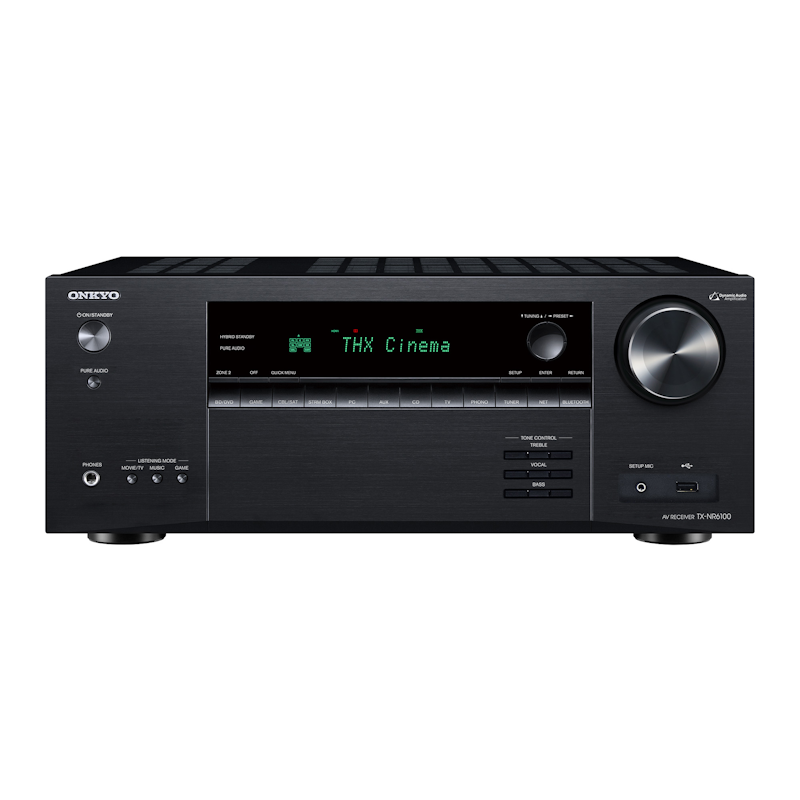
The Onkyo TX-NR6100 is a well-rounded 7.2-channel AV receiver that brings 8K HDMI 2.1 features, robust amplification, and Dirac Live room correction to mid-range home theaters. It’s designed for users who want strong movie performance, gaming support, and flexible streaming without stepping up into flagship pricing.
In this review we test the Onkyo TX-NR6100’s sound, connectivity, and usability so you can decide whether it fits your system and listening priorities.
Onkyo TX-NR6100 7.2-Channel AV Receiver
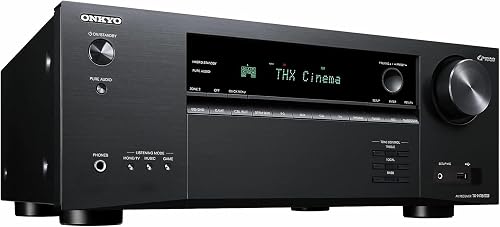
- Channels: 7.2-channel (up to 7.2.4 with external amps)
- Power: 100W × 7 (8Ω, 0.08% THD)
- Video: 8K/60Hz & 4K/120Hz — HDMI 2.1 on 7 inputs / 2 outputs
- Room Correction: Dirac Live (license included)
- Streaming: Wi-Fi, Bluetooth, Chromecast built-in, AirPlay 2, Spotify Connect
- Formats: Dolby Atmos, DTS:X, IMAX Enhanced
- Full HDMI 2.1 with 8K/60Hz and 4K/120Hz passthrough
- Dirac Live room correction for precise acoustic calibration
- Strong 100W × 7 amplification for larger rooms
- Broad streaming: Chromecast, Spotify, AirPlay 2
- Excellent sound clarity for both movies and music
- Dirac Live activation requires additional software setup
- On-screen UI feels dated versus Denon / Yamaha rivals
- Higher price than entry-level 7.2-channel options
AmplifierZone Editorial Rating
The Onkyo TX-NR6100 delivers excellent 8K passthrough, immersive Dolby Atmos, and powerful Dirac Live calibration in a well-built chassis. A strong midrange AV receiver for home theater enthusiasts.
Reviewed by AmplifierZone Editorial Team · October 2025
Best-in-class 8K AV receiver for home theater and gaming setups.
Key Features & Specs
| Model | Power Output | Channels | Video Support | Key Features | Price |
|---|---|---|---|---|---|
| Onkyo TX-NR6100 | 100 W × 7 (8 Ω) | 7.2 Channel | 8K / 60 Hz, 4K / 120 Hz | Dirac Live, HDMI 2.1, Wi-Fi / Chromecast / Spotify | Check price on Amazon |
Sound Quality & Performance
Sonically, the TX-NR6100 leans toward a clean, dynamic presentation — tight bass, focused mids, and crisp highs for both movies and music. Its onboard amp delivers immersive Dolby Atmos staging with ample headroom for medium to large rooms.
The Onkyo TX-NR6100 excels at transient clarity and low distortion. Dialog stays intelligible even in dense scenes, while stereo playback remains open and detailed — impressive balance for this price range.
Features & Usability
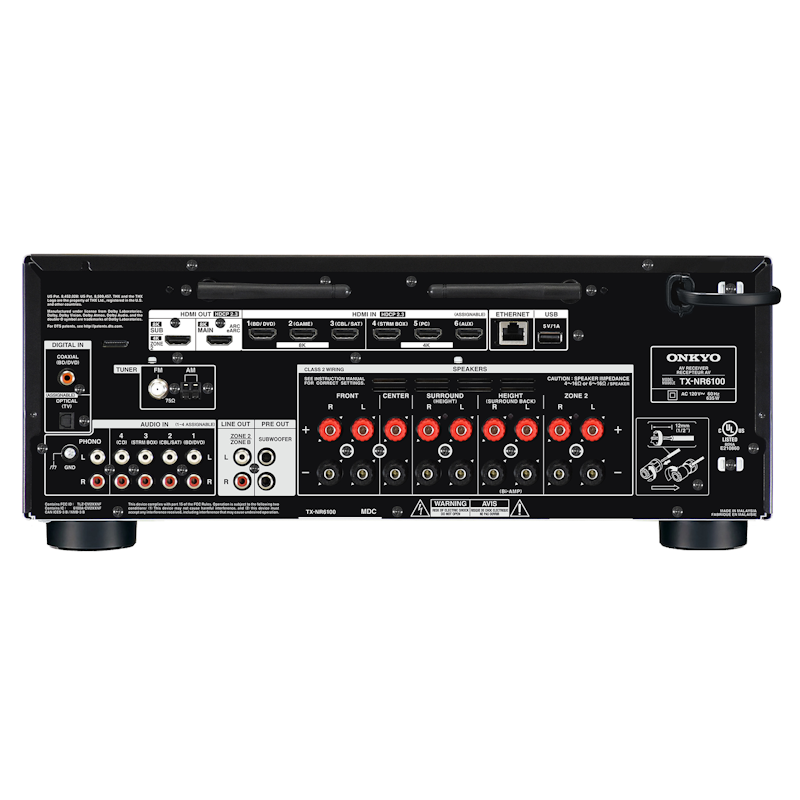
The Onkyo TX-NR6100 includes full-bandwidth HDMI 2.1 ports (8K/60 Hz, 4K/120 Hz), eARC, and built-in Chromecast, AirPlay 2, and Spotify Connect. Dirac Live room correction (optional activation) refines acoustic accuracy by adjusting timing and frequency response.
Setup is guided by Onkyo’s clear on-screen wizard, while gamers benefit from VRR and ALLM for next-gen consoles. Build quality feels sturdy, with simple front controls and a bright display.
How to Set Up Dirac Live
One highlight of the Onkyo TX-NR6100 is its Dirac Live integration. Using the included calibration mic and software, setup takes about ten minutes and instantly tightens bass, smooths mids, and clarifies imaging. You can store multiple profiles for movies, gaming, or music — a flexible upgrade that makes the system sound far more balanced in real-world rooms.
How to Set Up Dirac Live on the TX-NR6100
One of the TX-NR6100’s standout advantages over similarly-priced receivers is its bundled Dirac Live room correction license — a calibration platform that competitors often charge extra for or exclude entirely. Here’s how to get the most out of it once the receiver is installed.
Step 1 — Download the Dirac Live desktop app. Head to the Dirac Research website and download the free application for Windows or macOS. You’ll create an account and register your receiver’s serial number to activate the license that ships with the TX-NR6100.
Step 2 — Set up the calibration microphone. The TX-NR6100 includes a calibrated USB measurement microphone. Plug it into the USB port on the front panel and position it at ear level in your primary listening seat using a mic stand or tripod — accuracy here matters.
Step 3 — Run the measurement sweep. Dirac Live communicates with the receiver over your local network. The guided wizard prompts you to take impulse response measurements from up to nine positions around your listening area. Plan for 10–15 minutes and keep the room quiet during sweeps.
Step 4 — Upload the correction filter. Once all positions are measured, Dirac Live calculates a correction filter targeting a defined response curve — flat by default, though you can edit it freely. The filter uploads directly to the receiver. No external processing hardware is required during playback.
The result is noticeably tighter bass, reduced room modes, and improved stereo imaging compared to Onkyo’s built-in AccuEQ system. For best results, run Dirac Live first and then make manual per-channel level trims afterward.
TX-NR6100 vs. the Competition: Denon AVR-X2800H and Yamaha RX-V6A
At this price point, the TX-NR6100 competes directly against the Denon AVR-X2800H and the Yamaha RX-V6A. All three offer 7.2 channels with HDMI 2.1 connectivity, but the differences matter depending on your priorities.
TX-NR6100 vs. Denon AVR-X2800H: The most meaningful difference is room correction. The TX-NR6100 ships with Dirac Live; the X2800H uses Audyssey MultEQ XT32. Audyssey is a capable system — it performs reliably in typical rooms — but Dirac Live’s phase and time-domain correction gives it an edge in acoustically difficult spaces. On the other hand, Denon’s HEOS interface and streaming ecosystem are generally more polished than Onkyo’s. If your room has challenging acoustics and you want the best possible calibration included in the box, the TX-NR6100 wins this head-to-head.
TX-NR6100 vs. Yamaha RX-V6A: Yamaha’s YPAO room correction is solid but falls short of Dirac Live’s precision. The RX-V6A has a slight edge in user interface design and benefits from Yamaha’s MusicCast multi-room ecosystem. However, the TX-NR6100 typically delivers more rated power per channel — 100W × 7 vs. the RX-V6A’s 80W × 7 — which matters in larger rooms or with power-hungry speakers. For gaming, both receivers pass 4K/120Hz via HDMI 2.1 with low added latency.
The short version: Choose the TX-NR6100 when Dirac Live room calibration is a priority and your room acoustic challenges are real. Choose the Denon AVR-X2800H if you want a smoother out-of-the-box streaming experience. Choose the Yamaha RX-V6A if MusicCast multi-room audio matters to your setup.
Buying Guide: Is the Onkyo TX-NR6100 Right for You?
Choose the TX-NR6100 if you want HDMI 2.1 for gaming and 8K readiness with room-calibrated sound. It strikes a balance between raw power and modern convenience rarely seen below $1,000.
For comparisons, see Best AV Receivers Under $1000 or our Sony STR-DH790 and Yamaha RX-V6A reviews to decide which sound signature fits you best.
Related Receiver to Consider
For a different ecosystem or sonic flavor, see the Yamaha RX-V6A Review. If budget is key, our Sony STR-DH790 Review covers an affordable Dolby Atmos option.
Final Verdict
The Onkyo TX-NR6100 combines power, precision, and next-gen connectivity in a single chassis. It’s a future-ready AVR for movie lovers and gamers who demand real performance without flagship complexity.
Compare it directly with peers in our best AV receivers under $1,000 guide guide or read the upcoming Denon S670H Review for a simpler plug-and-play alternative.
Frequently Asked Questions
Does the Onkyo TX-NR6100 support 8K video?
The TX-NR6100 passes 8K/60Hz and 4K/120Hz signals through its HDMI 2.1 ports, making it ready for 8K TVs and next-gen gaming consoles. It does not upscale to 8K — it passes the signal as-is from source to display.
Does the TX-NR6100 include room correction?
Yes. The TX-NR6100 uses Onkyo’s AccuEQ room correction with a supplied calibration microphone. It measures your speakers and room acoustics automatically, adjusting levels, distances, and EQ curves for each channel. It is not as advanced as Dirac Live or Audyssey XT32, but it handles most rooms effectively out of the box.
Is the Onkyo TX-NR6100 good for gaming?
Yes — it has two HDMI 2.1 ports that support 4K/120Hz passthrough, Variable Refresh Rate (VRR), and Auto Low Latency Mode (ALLM), making it a strong pairing for PS5 and Xbox Series X. Game Mode keeps video processing latency minimal.
How many zones does the TX-NR6100 support?
The TX-NR6100 supports two audio zones. Zone 2 outputs analog audio to a separate room, but you will need a separate amplifier or powered speakers for that second zone — the receiver does not power Zone 2 on its own.
How does the TX-NR6100 compare to the TX-NR7100?
The TX-NR7100 adds a third zone, Dirac Live room correction, and slightly higher power output. If you need multi-room audio or more precise calibration, the NR7100 is worth the upgrade. For a two-zone home theater on a tighter budget, the NR6100 covers everything you need.